Quick Answer
Pressure washers may have three pressure settings that allow you to adjust power depending on the cleaning task. These range from a low-pressure foam setting through to a high-pressure cleaning mode for tougher surfaces.
The settings are selected directly on the unit and are indicated by numbered levels or pressure indicators on the display.
Before You Start
Before changing pressure settings, make sure:
- The pressure washer is switched on
- The water supply is connected and flowing correctly
- The correct lance or accessory is attached
Always:
- Start on a lower pressure setting before increasing power
- Ensure the trigger is not being pulled when changing settings
- Keep hands clear of the nozzle during adjustment
Important: Do not point the lance at people, animals, or fragile surfaces when testing pressure settings.
Pressure Setting Overview
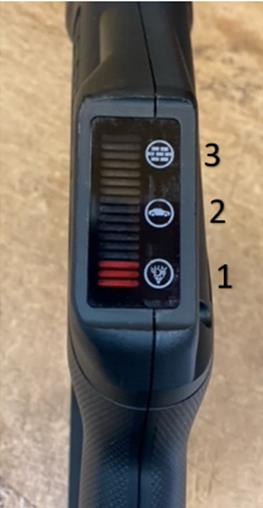
Pressure washers typically include three settings:
Setting 1 - Lowest Pressure (Foam Mode)
This is the lowest pressure setting and is mainly used for applying detergent or foam.
It is ideal for:
- Pre-washing vehicles
- Applying cleaning solutions
- Light surface coverage
Setting 2 - Medium Pressure (General Cleaning)
This setting provides a balanced pressure suitable for everyday cleaning tasks.
It is ideal for:
- Washing cars
- Cleaning light dirt from patios
- Rinsing outdoor furniture
Setting 3 - High Pressure (Maximum Power)
This is the highest pressure setting available on the machine.
It is ideal for:
- Cleaning brickwork
- Washing patios
- Removing stubborn dirt from decking
Trouble Reaching Maximum Pressure
If the pressure indicator does not reach the highest level when using setting 3, this may be due to one of the following:
1. Turbo lance not attached
The machine may not reach full pressure without the turbo lance fitted. Ensure the correct lance is installed for maximum performance.
2. Air trapped in the system
Air pockets in the system can cause inconsistent pressure output.
To fix this:
- Run the pressure washer with water flowing
- Hold the trigger open for a short period
- Allow the water to run through until pressure stabilises
This process is known as a line purge and helps remove trapped air.
When to Seek Further Help
If you have checked the lance and performed a line purge but are still experiencing issues:
- Contact our live chat team
- Or raise a support ticket with your model details
Our team can help confirm whether there is a pressure delivery fault or accessory issue.
Frequently Asked Questions
Why does my pressure washer have different pressure settings?
The settings allow you to adjust water pressure depending on the surface and cleaning task.
Why is my pressure not reaching the highest setting?
This is usually due to the turbo lance not being attached or air trapped in the system.
Can I change pressure settings while using the machine?
No. You should stop spraying before adjusting settings to ensure safe operation.
What is the lowest pressure setting used for?
It is mainly used for applying foam or detergent safely before rinsing.
What is a line purge?
A line purge removes trapped air from the system to help stabilise water pressure and improve performance.